Password Recorder for KDP Interiors: Practical Applications and Design Considerations
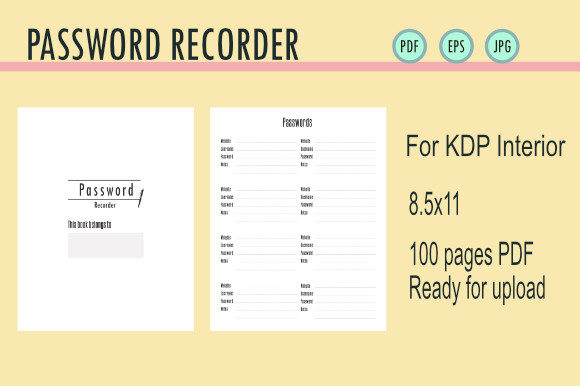
Creating a functional Password Recorder for KDP Interiors goes far beyond simply drawing lines on a page. For self-publishers and digital product creators, this specific niche represents a unique intersection of utility design and low-content publishing. When you are working with an 8.5x11 100-page template in formats like EPS, PDF, or JPG, the primary goal is to solve a tangible problem for the end-user: organizing digital security in an analog format. The most successful interiors in this category are not just blank tables; they are thoughtfully engineered tools that anticipate how people actually manage their online lives.
The value of these interiors lies in their specificity. A generic notebook can hold passwords, but a dedicated recorder provides structure, prompts, and safety features that reduce friction. For creators uploading to Amazon KDP or selling digital downloads on Etsy, understanding the nuance of this layout is what separates a bestseller from a forgotten file. It requires balancing aesthetic appeal with rigorous functionality, ensuring that every inch of the 8.5x11 canvas serves a purpose without feeling cluttered.
Real-World Scenarios for Analog Password Management
It might seem counterintuitive to write down passwords in an era of cloud-based password managers, but the demand for physical recorders stems from very real, practical pain points. Understanding these scenarios helps in designing an interior that feels necessary rather than redundant.
The Senior Demographic and Digital Transition
One of the largest audiences for password logbooks consists of older adults who are increasingly navigating digital services but may not trust or understand encrypted vaults. For this group, a Password Recorder for KDP Interiors acts as a bridge. They often prefer a physical book because it feels tangible and permanent. However, their needs differ significantly from younger users. They typically require larger font sizes, higher contrast between text and background, and simplified fields. A dense, tiny grid is unusable for someone with presbyopia or mild tremors. Successful interiors for this demographic prioritize readability over data density, perhaps offering fewer entries per page to maintain clarity.
Estate Planning and Legacy Organization
A critical, often overlooked use case is estate planning. Families frequently face the nightmare of being locked out of essential accounts after a loved one passes away. In this context, the password recorder serves as a legacy document. Users aren't just storing login credentials; they are documenting access to photo archives, financial assets, and subscription services. Interiors designed for this purpose often include sections for "emergency contacts," "device passcodes," and "security questions," rather than just username/password fields. This transforms the book from a simple log into a vital component of end-of-life organization.
The Cybersecurity-Conscious Skeptic
There is a growing segment of users who actively avoid storing sensitive data online due to fears of cloud breaches or hacking. For these individuals, paper is the ultimate air-gapped storage. They seek out physical recorders specifically because they are offline. When designing for this audience, the focus should be on security features within the book itself. This might include a dedicated ownership page, space for a master lock combination, or layouts that discourage writing the actual password directly (prompting hints instead). Acknowledging their security mindset in the design builds trust and makes the product feel aligned with their values.
Designing for Functionality in 8.5x11 Formats
The 8.5x11 size is the industry standard for password logs because it offers ample horizontal space for long URLs and complex notes. However, having space and using it well are two different things. When preparing your EPS, PDF, or JPG files for upload, consider how the physical act of writing interacts with the layout.
- Column Width Ratios: Modern passwords are long and complex. Allocating equal space to "Website" and "Password" is usually a mistake. The password field typically needs to be 40-50% wider than the site name field to accommodate special characters and length without cramping handwriting.
- Binding Margin Safety: Nothing frustrates a user more than losing data in the gutter of a book. For a 100-page KDP interior, maintaining a generous inner margin (at least 0.75 to 1 inch) is non-negotiable. This ensures the book can lay relatively flat and remain legible even when fully bound.
- Alphabetical Tabbing: Pre-printed alphabetical tabs or index sections at the front of the book dramatically increase utility. Without them, a 100-page book becomes a chaotic search mission. Integrating these navigational aids directly into the interior design adds immense perceived value compared to a plain lined journal.
- Paper Opacity Awareness: Remember that KDP standard paper is 55# (90 GSM). Heavy ink or gel pens can bleed through. Designing with lighter gray lines instead of stark black helps reduce visual noise and minimizes the appearance of bleed-through from the reverse side.
Technical Preparation for Upload and Sale
Whether you are uploading directly to KDP or selling the source files as a commercial license asset, technical precision matters. The phrase "PDF Ready for upload EPS PDF JPG" implies versatility, but each format serves a distinct stage in the production pipeline.
Vector vs. Raster: Always maintain your master file in vector format (EPS or AI). Vector lines remain crisp at any zoom level and print with perfect sharpness. Converting to JPG should only be done for marketing mockups or specific digital download requirements, never for the final print-ready PDF. Rasterized text in a password log looks unprofessional and pixelated when printed.
Bleed and Trim Settings: If your design includes decorative borders or colored backgrounds that extend to the edge, you must account for bleed. For an 8.5x11 book, the uploaded PDF size should be 8.625 x 11.25 inches. Failing to add this 0.125-inch buffer results in white slivers along the edges after trimming. Conversely, if your design is borderless (text and lines only), select "No Bleed" in KDP settings and keep the file at exact trim size.
Font Licensing and Embedding: Ensure all fonts used in the interior are properly licensed for commercial print use. More importantly, embed all fonts in the final PDF. Missing fonts can cause KDP’s automated review system to substitute typefaces, ruining your carefully calculated column widths and spacing. Outlining text in the EPS master file prevents this issue entirely, though it increases file size.
Evaluating Strengths and Limitations
While a Password Recorder for KDP Interiors is a valuable product, it is important to approach creation with realistic expectations about its utility and market position.
The primary strength is simplicity. Unlike software, there is no learning curve, no subscription fee, and no battery requirement. It appeals to users experiencing digital fatigue. From a creator's perspective, it is an evergreen asset. Once designed correctly, a high-quality password log does not require annual updates like a planner or calendar. It can generate passive income for years with minimal maintenance.
However, limitations exist. Physical books lack search functionality and auto-fill capabilities. They cannot generate strong passwords or sync across devices. As a creator, you should not market these as replacements for enterprise-grade security tools, but rather as complementary solutions for specific niches. Additionally, the market is saturated with low-effort templates. To stand out, your interior must offer superior usability. Generic "Username/Password/Notes" columns are no longer sufficient. Adding value through specialized sections for 2FA codes, recovery emails, WiFi network details, or device PINs demonstrates a deeper understanding of user needs.
Another consideration is the ethical responsibility of selling security products. While you cannot control how users utilize the book, providing guidance pages on safe storage practices or suggesting the use of hints rather than plaintext passwords adds a layer of conscientiousness to your product. This builds brand reputation and aligns with helpful content principles by prioritizing user safety over mere aesthetics.
Differentiation Through Niche Adaptation
The most effective way to leverage these interiors is by adapting them for specific sub-niches rather than targeting "everyone." A password log for small business owners looks different than one for gamers or seniors.
For small businesses, include fields for vendor contacts, invoice numbers, and license expiration dates. These users manage SaaS subscriptions and need to track billing cycles alongside login credentials. For gamers, consider adding server names, character IDs, and friend codes. Their digital identity is tied to platforms like Steam or Discord, which have different metadata requirements than banking sites. For families, create shared sections for streaming services, utility bills, and school portals, acknowledging that household digital management is often a collaborative effort.
By tailoring the 100-page structure to these specific workflows, you move beyond commodity publishing. You provide a solution that feels custom-made, which justifies a higher price point and generates better reviews. The technical assets—EPS, PDF, JPG—are merely the delivery mechanism; the true product is the organized peace of mind you facilitate through intelligent, empathetic design.